# Using Hashnode's API for Blog Previews
I recently decided to host my blog on Hashnode so I could spend more time writing and less managing the code. I still wanted to display previews and links to my most recent posts on my portfolio website. Luckily, Hashnode offers a GraphQL API where I can fetch my most recent posts.
## The API
You can access the API playground and docs at [api.hashnode.com](https://api.hashnode.com/). This allows you to develop your query and give you the exact response you want. After reading the docs, I built a query to give me everything I needed to display a preview on my portfolio page.
```
{
user(username: "CodeByCorey") {
publication {
posts(page: 0) {
slug
title
brief
coverImage
replyCount
totalReactions
}
}
}
}
```
- `user(username: "CodeByCorey")`: Query for my user
- `publication`: Contains all information for my blog publication
- `posts(page: 0)`: Returns all the posts on the first page
- `slug`: So I can create a link to the blog post
- `title`: To display the title of my post
- `brief`: Is a small snippet of the text in the post
- `coverImage`: So I can show the cover image in the preview
- `replyCount`: The number of comments on the post
- `totalReactions`: Total number of reactions on my post
### Using the Query
Now that I have the query, it's time to use it to fetch the data. I created a new lib file in my Next.js app called `posts.ts`. I used fetch to make the API call and passed the query to the body of the request.
```typescript
const query: string = `
{
user(username: "CodeByCorey") {
publication {
posts(page: 0) {
slug
title
brief
coverImage
replyCount
totalReactions
}
}
}
}
`;
export const fetchPosts = async () => {
const resp: Response = await fetch('https://api.hashnode.com', {
method: 'POST',
headers: {
'Content-type': 'application/json',
},
body: JSON.stringify({ query }),
})
const hashnodeResponse = await resp.json();
return hashnodeResponse.data.user.publication.posts;
};
```
I wanted to only display the last three posts. I added another function to slice the posts to limit the response. This
```typescript
export const fetchThreeMostRecentPost = async() => {
const posts = await fetchPosts();
return posts.slice(0, 3);
}
```
Inside my container component, I used the Next.js `getStaticProps` function to fetch the posts and pass them to the props of my component. I added the revalidate setting to automatically regenerate my HTML when I create a new post on Hashnode.
```typescript
export async function getStaticProps() {
const posts = await fetchThreeMostRecentPosts();
return {
props: {
posts
},
revalidate: 60
};
}
```
Now that all the data is being fetched and passed to the props, It was now time to style my components. I have been using Tailwind CSS for my portfolio website. Here is the `RecentBlogPosts` component:
```typescript
export default function RecentBlogPosts({ posts }: Props) {
return (
);
}
```
BlogPreview:
```typescript
export default function BlogPreview({ post }: Props) {
return (
{post.title}
{post.brief}
Learn More
{post.totalReactions}
{post.replyCount}
);
}
```
The result after styling my components:
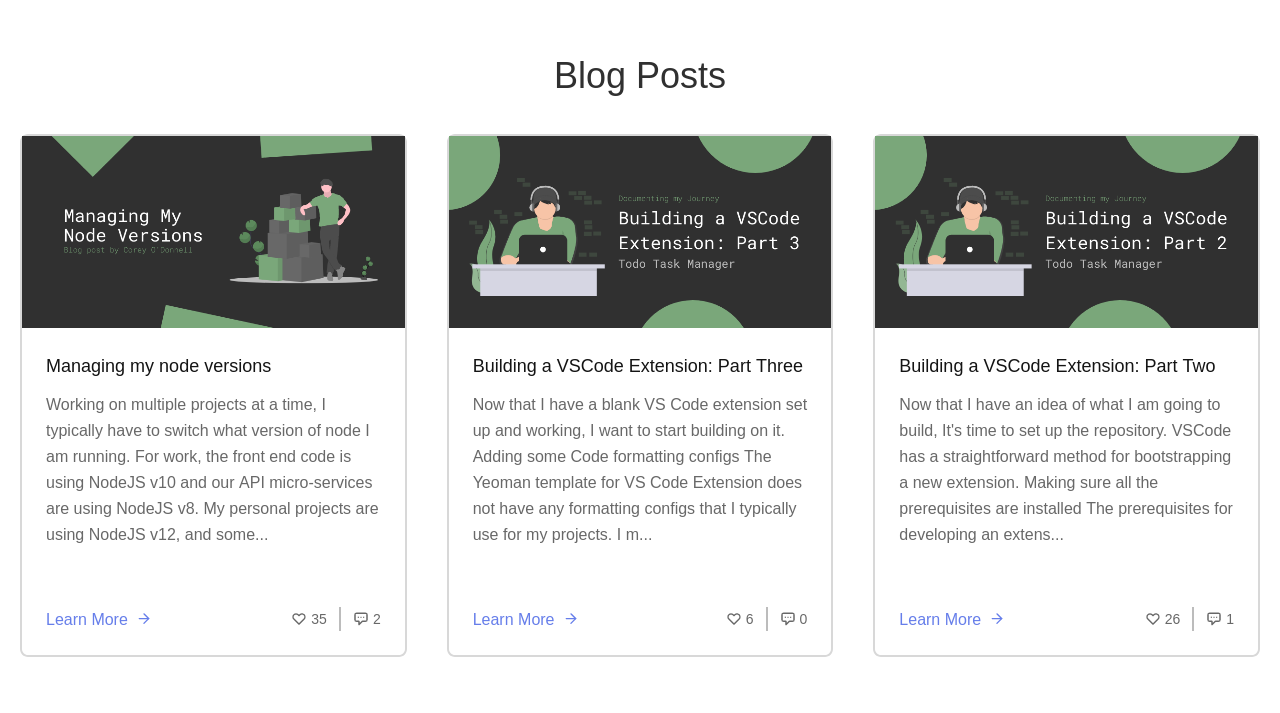
---
- Hashnode API - [api.hashnode.com](https://api.hashnode.com/)
- Next.js Docs - [https://nextjs.org/](https://nextjs.org/)
- You can check out my [portfolio page](https://coreyodonnell.tech) - [Source Code](https://github.com/CodeByCorey/coreyodonnell.tech)(work in progress)
- Follow me on [Twitter](https://twitter.com/CodeByCorey) for random posts about tech and working from home.